
Client description:
Enversed studio is a tech company based in Eindhoven that develops VR/AR experiences for various purposes and companies. From pure entertainment games that you can try in their VR centre to VR training apps and AR app to enhance a visitor’s experience in a museum… They try to make the best usage of VR and AR.
Description of the challenge:
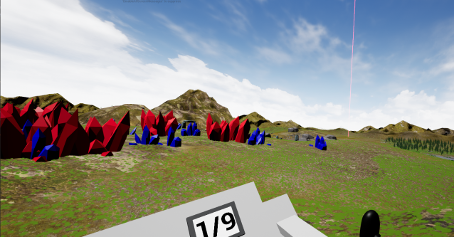
We were tasked to make a prototype for a VR racing/driving game where the player explores a new planed in a pod racer. The setting for this experience was a semi futuristic/steampunk world were humanity has built huge hot air balloons, floating ships and zeppelins and tried to colonize new habitable planets (This world where the game has to take place in has already been used in other Enversed’s projects). On top of all these constraints, the game has to be playable with the “YawVR”, a motion simulator that further immerses the player in the game’s world. The YawVR is a chair that has the ability to tilt, rotate and roll to better reflects what is happening in the game.
Description of the game:
As part of a new exploration expedition, you are dropped in your floating ship in a remote part of the area. The mothership would like you to visit some specific landmarks it has caught sight of from low orbit. But be quick, they won’t wait you forever and you never know what could happen in an unknown planet.
As the player, you must go through a series of checkpoints that activates over time using your driving skills and your small floating vessel. Float, turn, accelerate, use the environment to your advantage and try to visit as much checkpoints as possible (and also enjoy the view while you’re at it).
(This game is made to be player in VR with a YawVR motion simulator to reduce motion sickness and improve immersion in the game’s world)
How to play the game:
Once you have connected your VR headset to the Yaw VR motion simulator (If applicable), you can start playing.
Use the trigger on the right controller to accelerate and the one on the left to brake and go backwards. Turn using the right controller’s stick.
How to install the game ?
- Clone the repository using this link (git@projects.fhict.nl:gdt/spring-24/basic/enversed.git )
- Go to the cloned folder
- Unzip the “Build” folder
- Open the unzipped “Build” folder
- Click on the “.exe” file to launch the game
- You are ready to explore the planet KR-T-V
Key features:
- Full VR experience
- A type of vehicle not seen often in VR games
- Compatibility with the YawVR motion simulator
- Multiple zones to drive through
- Simple control scheme
A project made (with “care”) by:
- Jonathan Kat – Project Manager/Programmer
- Billy Hofland – SCRUM Master/Programmer
- Micah van Everdingen – Lead Programmer
- Anastasia Stepanova (Lithuanian exchange student) – Art/Assets Manager/Researcher
- Hristo Ganchev (Bulgarian exchange student) – Lead Level Designer/Researcher
- Maxence Moncel (French exchange student) – Git Master/Programmer
Thanks for playing!