

Client Description:
Garage2020 is working to achieve this goal by designing solutions for concrete problems experienced by children, young people, parents, and their environment. The organization does this in collaboration with various experts, and with those for whom the innovation is intended so that their perspective is central. With these innovations, they want to prevent, shorten or replace existing forms of youth care.
Children waiting for Youth Care, wait for an average of 10 months to get help. During this time, their problems can worsen very badly. They want these children to be “distracted” while waiting for the actual help.
Description of the Assignment
Our stakeholder had several major requirements that they wanted us to implement.
- Communication between players. Before our contributions the game was using an SQL database and API that was made by our previous group this required a host pc to be running the DB and API and was therefore not possible to deploy for our stakeholders. We were tasked to replace this with a cloud solution and decided on using Firebase/Firestore.
- Testable on Mobile. The game before our contributions was working when built for desktop, however it had some problems when building to mobile. The communication to the backend also was not fully functioning on mobile, this was also a reason we switched to a cloud solution.
- UI Redesign. Prior to our contributions the game had a non congruent style. We received a style guide for what our stakeholder wanted the game to look like. We redesigned some UI elements and restyled other existing UI elements. An example of the style guide can be found later in this document.
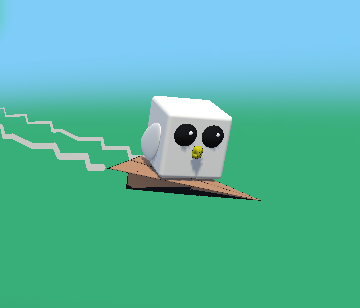
- Gamify/Microgame interactions. Another goal of ours for this game was to gamify some mundane interactions using microgames to enhance user experience. Prior to our contributions the game had functionality for core game aspects, but our goal was to gamify these interactions to make them more fun. An example of this is the simple act of clicking a “Send Message” button was replaced with a flappy-bird style game with a paper airplane sending a message.
Game Description:
The primary objective of the game for the child is to foster social connections and receive support in dealing with difficult situations. Players do this by sending messages to other players who are in similar situations. The player will also choose and customize a virtual companion animal that will provide companionship throughout the game. Additionally, the game includes a diary feature for the child to document their thoughts and experiences, which can aid in coping with stress and negative emotions.
Team Members:
- – Broers, Kwadjo
- – Munteanu, Dragos
- – Šimkevičius, Markas
- – Dongen, Rowan
Key features of the game:
- Messaging system, backed by a Firebase cloud database.
- Customizable 3D Pets
- Diary
- Lock
- Mood selection
- Locally saved
- Stickers
- Sending stickers
- Collecting stickers
- Microgames
- Sticker memory game
- Mail delivery game
Supported platforms: Android
How To Play:
–When you first open the game you are prompted to create a new pet. After creating a pet you can use the bottom row of buttons to navigate to the different parts of the game.
Messages:
There are 3 buttons to click when it comes to messages. The first one is to view replies to your sent messages, the second button is to view messages you received. And the final button is to send a message out.
Installation instructions:
1 Allow installations from unknown sources on android.
2 Download the .APK file for the game using either the following link or QR-code.https://drive.google.com/file/d/1P_wsiSciEhYqZPkJjh2NMEn6jPhV9gEk/view?usp=drive_link

3 Install the game by clicking on the .APK file you just downloaded.